Free Solitaire Solver: Check If Your Klondike Game Is Winnable
Ever spent 15 minutes on a Klondike Solitaire game only to realize it was unwinnable from the start? About 21% of Draw 1 deals and 70% of Draw 3 deals are mathematically impossible to win — no matter how perfectly you play. TrySolitaire's built-in solitaire solver eliminates this frustration by analyzing your game position in real time and telling you whether a winning path exists.
Unlike external solver tools that require you to manually input card positions, our solver is integrated directly into the game interface. It runs in the background, works on any device, and is completely free with no account required.
Play Solitaire with Built-in SolverTable of Contents
- What Is a Solitaire Solver?
- How to Use the Solver
- Solver-Powered Features
- How the Solver Works (Technical)
- Deal Winnable Games
- Undo to Winnable Recovery
- Solvability Statistics
- TrySolitaire vs External Solvers
- Frequently Asked Questions
What Is a Solitaire Solver?
A solitaire solver is an algorithm that analyzes a Klondike Solitaire game position and determines whether any sequence of legal moves can lead to a win. Think of it as a chess engine for solitaire — it explores millions of possible move combinations to find a winning path or prove that none exists.
Traditional solitaire solvers are standalone tools where you manually enter your card layout, wait for analysis, and get a result. TrySolitaire takes a different approach: the solver is built directly into the game, running silently in the background while you play. You get real-time feedback on your game's solvability without interrupting your flow.
- No manual input: The solver reads your game state automatically
- Real-time feedback: Check solvability at any point during play
- Deal winnable games: Start with guaranteed-solvable hands
- Undo to winnable: Rewind to the last solvable position when stuck
- 100% free: No ads, no premium features, no account required
- 100% private: Runs in your browser — no data sent to servers
How to Use the Solitaire Solver
The solver integrates seamlessly into the game toolbar. Here's what each status icon means:
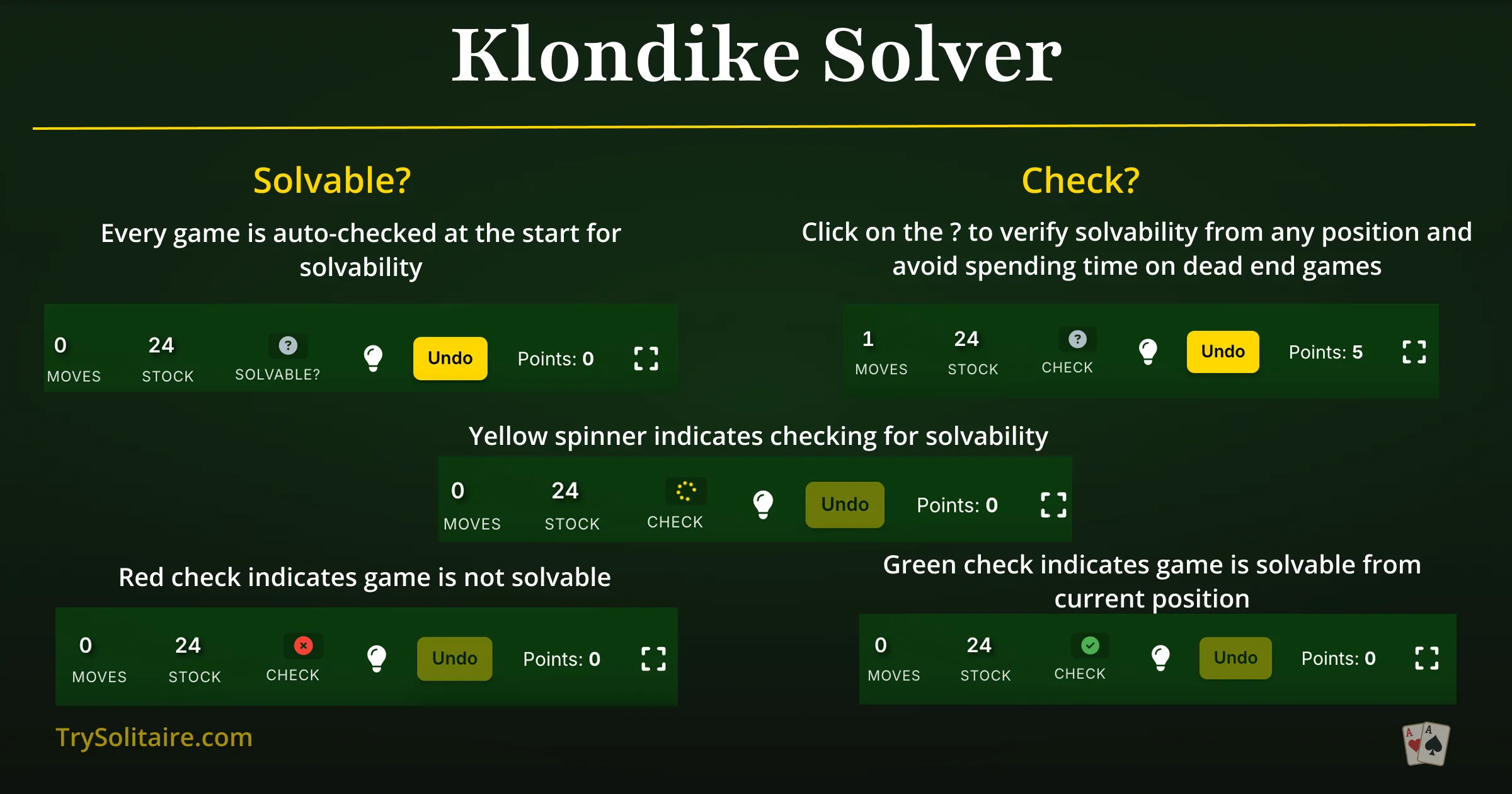
Understanding Solver Status Icons
- Green Checkmark (Solvable) — The solver has verified that a winning path exists from your current position. You can win this game if you find the right moves.
- Red X (Unsolvable) — No winning path exists from your current position. Click the red X to open recovery options including undo-to-winnable.
- Gold Spinner (Calculating) — The solver is actively analyzing your position. This typically completes within a few seconds.
- Gray Question Mark (Idle/Unknown) — The position hasn't been checked yet, or the solver timed out. Click to trigger a new analysis.
Step-by-Step: Using the Solver During Play
- Start a new game — The solver automatically begins analyzing the initial deal in the background.
- Play normally — Make your moves as you would in any Klondike game.
- Check solvability — At any point, look at the solver icon in the toolbar. Click it to trigger a fresh analysis of your current position.
- Green checkmark? Keep playing — a winning path exists.
- Red X? Click it for recovery options. Choose "Undo to Winnable" to rewind to the last solvable position and try a different strategy.
Solver-Powered Features
1. Deal Winnable Game
The "Deal Winnable" option appears in the new game menu. When selected, the solver searches for a random deal that has at least one verified winning path before dealing it to you. This guarantees that the game is solvable — though you still need skill and strategy to find the winning moves.
When to Use Deal Winnable
- Learning: Focus on developing strategy without worrying about impossible deals
- Time-limited play: Don't waste a coffee break on an unwinnable game
- Draw 3 mode: Especially useful since ~70% of Draw 3 deals are unwinnable
- Improving win rate: Practice with solvable games to build confidence and skill
2. Undo to Winnable Recovery
When the solver detects that your game has become unsolvable — typically because of a move that closed off the last winning path — a recovery panel appears with three options:
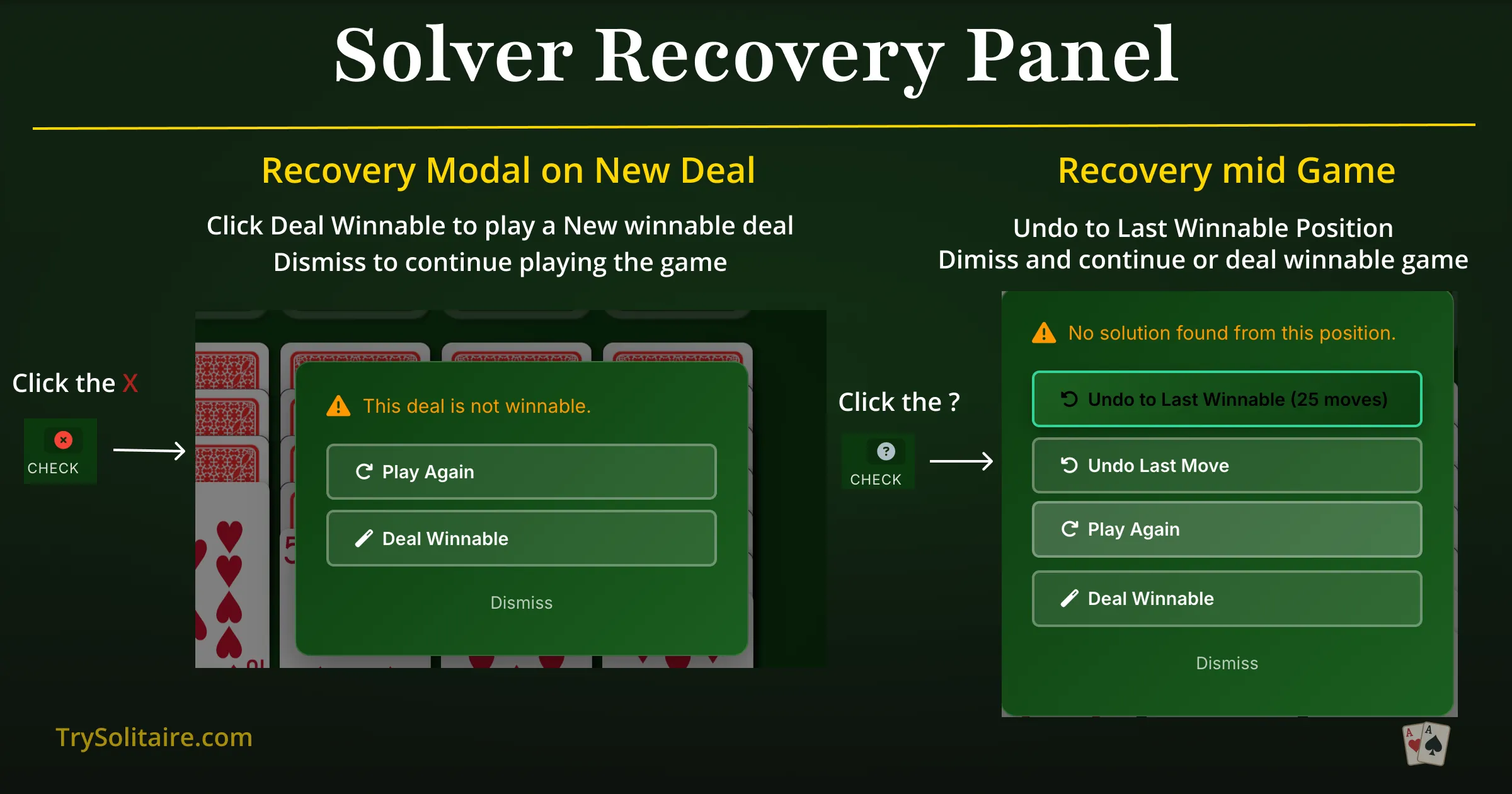
- Undo to Winnable: The solver automatically rewinds your game to the last position where a winning path existed. This is the most powerful option — you can try a different move from that point without losing all your progress.
- Deal New Game: Start fresh with a new deal. The solver will immediately analyze the new deal.
- Continue Playing: Dismiss the panel and keep playing the current game, even though it's unsolvable. Some players enjoy completing games even without a win.
3. Background Seed Validation
Every time you start a new game, the solver silently analyzes the deal in the background. Within seconds of your first deal, you'll see the solver icon update to show whether the game is winnable — before you've even made your first move. This lets you make an informed decision about whether to commit to the game or deal again.
4. Active Position Checking
Click the solver icon at any point during your game to trigger a fresh analysis. This is useful when you're deep into a game and want to verify that your strategy hasn't led to a dead end. The solver analyzes your exact current position — not just the initial deal — so it accounts for every move you've made.
How the Solver Works
For those curious about the technology behind the solver, here's a look under the hood.
Algorithm: Depth-First Search with Iterative Deepening
The solver uses a depth-first search (DFS) algorithm with iterative deepening to explore the game tree. Starting from your current position, it systematically tries every possible legal move, then every possible follow-up move, and so on, searching for a sequence that leads to all 52 cards on the foundations.
Iterative deepening means the solver first searches to a shallow depth (150 moves), then progressively increases the limit (250, 400, 600 moves) if no solution is found. This approach finds shorter solutions first while still being thorough.
Smart Optimizations
Raw brute-force search would be far too slow — Klondike has an astronomical number of possible game states. The solver uses several optimizations to search efficiently:
- Dominance moves: Aces and 2s are always moved to foundations automatically, since this is never a bad move. This prunes the search tree significantly.
- State deduplication: The solver tracks previously visited game states using compact hashing. If it reaches a position it's already analyzed, it skips it — avoiding wasted computation on repeated states.
- Smart move ordering: Moves are tried in a strategic order (foundation moves first, then tableau-to-tableau, then stock draws) to find solutions faster.
- Recycling limits: The solver limits stock pile recycling (2 passes for Draw 3, 3 for Draw 1) to keep the search space manageable.
Performance Limits
- Max evaluations: Up to 10 million move combinations per analysis
- Time limit: 30 seconds per solve attempt
- Background processing: Runs in a Web Worker (separate thread) so it never blocks the game UI
- Memory efficient: Uses compact integer representation (0-51) for cards instead of objects
Privacy Note
The solver runs 100% in your browser using a Web Worker. Your game state, move history, and analysis results never leave your device. There is no server-side processing, no API calls, and no data collection of any kind. The solver works completely offline once the page is loaded.
Klondike Solvability Statistics
Understanding the mathematics of Klondike solvability helps explain why a solver is so valuable:
Draw 1 Klondike
of deals are winnable with perfect play
~21% of games are mathematically impossible to win
Draw 3 Klondike
of deals are winnable with perfect play
~70% of games are mathematically impossible to win
These statistics reveal a critical insight: without a solver, you're likely wasting significant time on unwinnable games — especially in Draw 3 mode. The solver ensures you know immediately whether your time investment can pay off.
Impact on Your Win Rate
The solver doesn't just save you from unwinnable games — it can dramatically improve your overall experience:
- Without solver (Draw 1): Average player wins 15-20% of games, spending significant time on the 21% that are impossible
- With Deal Winnable (Draw 1): Every game starts solvable — your skill is the only factor, with potential win rates of 40-50% for experienced players
- Without solver (Draw 3): Average player wins 1-5% of games, with 70% of deals being impossible
- With Deal Winnable (Draw 3): Every game starts solvable — win rates can reach 10-15% for skilled players
TrySolitaire Solver vs External Solver Tools
There are several external Klondike solver tools available online. Here's how TrySolitaire's built-in solver compares:
| Feature | TrySolitaire (Built-in) | External Solver Tools |
|---|---|---|
| Input Method | Automatic (reads game state) | Manual card entry required |
| Real-time Checking | Yes, during gameplay | No, separate tool |
| Deal Winnable | Yes | No |
| Undo to Winnable | Yes | No |
| Privacy | 100% client-side | Data sent to server |
| Cost | Free, no limits | Often limited or paid |
| Draw 3 Support | Yes | Varies |
| Works Offline | Yes | Rarely |
Frequently Asked Questions About the Solitaire Solver
What is a solitaire solver?
A solitaire solver is an algorithm that analyzes a Klondike Solitaire game position and determines whether any sequence of legal moves leads to a win. TrySolitaire's solver uses depth-first search with iterative deepening, evaluating up to 10 million move combinations. It's built directly into the game — no manual card input required.
Is the solitaire solver free?
Yes, completely free with no limitations, no ads, and no account required. The solver runs in your browser and works even offline. All features — solvability checking, Deal Winnable, and Undo to Winnable — are included at no cost.
Does the solver tell me which moves to make?
No. The solver only tells you whether a winning path exists — not what the specific moves are. This preserves the challenge and satisfaction of finding the solution yourself. For move suggestions, use the separate Hint feature, which recommends strong next moves based on strategic principles.
Does the solver work on mobile?
Yes. The solver works on all devices including iPhone, iPad, Android phones and tablets, and desktop browsers. It uses the same Web Worker technology on every platform, providing consistent performance regardless of device.
Does the solver support Draw 3 Klondike?
Yes. The solver fully supports both Draw 1 and Draw 3 modes. Draw 3 analysis is especially valuable since about 70% of Draw 3 deals are unwinnable — the solver saves you from spending time on these impossible games.
How accurate is the solver?
When the solver reports a green checkmark, it has found a verified winning path — this is 100% accurate. When it shows a red X, it has exhaustively searched the reachable game states and confirmed no winning path exists. In rare cases with extremely complex positions, the solver may time out and show a gray question mark, indicating it couldn't determine solvability within its limits (10 million evaluations, 30-second timeout).
Is my game data sent to a server?
No. The solver runs 100% client-side in your browser using a Web Worker. Your game state never leaves your device. There are no API calls, no data collection, and no tracking. The solver works completely offline once the page has loaded.
Can I use the solver to cheat?
The solver tells you whether you can win, not how. Knowing a game is solvable doesn't make finding the solution any easier — you still need strategy and planning to navigate the correct sequence of moves among thousands of possibilities. Most players use the solver to avoid wasting time on unwinnable deals, not to gain an unfair advantage.
What makes TrySolitaire's solver different from others?
Most solitaire solvers are standalone tools that require you to manually enter your card positions. TrySolitaire's solver is integrated into the game itself, automatically reading your game state, providing real-time feedback, and offering unique features like Deal Winnable and Undo to Winnable. It's also 100% client-side, free, and works offline — a combination no external tool can match.
Try the Solitaire Solver Now
Play Klondike Solitaire with the built-in solver — free, no ads, no sign-up.
Play Solitaire with Solver✓ Built-in solver | ✓ Deal winnable games | ✓ Undo to winnable | ✓ 100% free | ✓ No ads
Related Articles
- Klondike Solitaire — Complete guide with rules, strategy, and win rates
- Is My Solitaire Game Winnable? — Understanding solitaire solvability
- Klondike Strategy Guide — Expert tips to improve your win rate
- How to Win at Solitaire — Proven strategies for all solitaire variants